
Social media has become an important part of building an online presence, promoting a business, and connecting with an audience. Whether you run a small business, manage a personal brand, or create content for a blog, posting regularly can help you stay connected with your followers.
However, creating social media posts every day without a plan can be stressful. You may run out of ideas, forget important dates, or publish content without a clear purpose. This is where a social media content calendar can help.
A social media content calendar allows you to plan, organize, and schedule your posts in advance. It helps you decide what to post, when to post, and which platform to use.
In this beginner-friendly guide, you will learn how to create a social media content calendar, how to choose content ideas, how to organize your weekly schedule, and how to improve your social media strategy.
What Is a Social Media Content Calendar?
A social media content calendar is a planning document that shows the content you intend to publish on social media platforms.
It can include details such as:
- Post date
- Social media platform
- Content topic
- Post format
- Caption
- Visual or video idea
- Target audience
- Content goal
- Publishing status
You can create a content calendar using a notebook, spreadsheet, or digital planning tool. The most important thing is to choose a system that is easy for you to maintain.
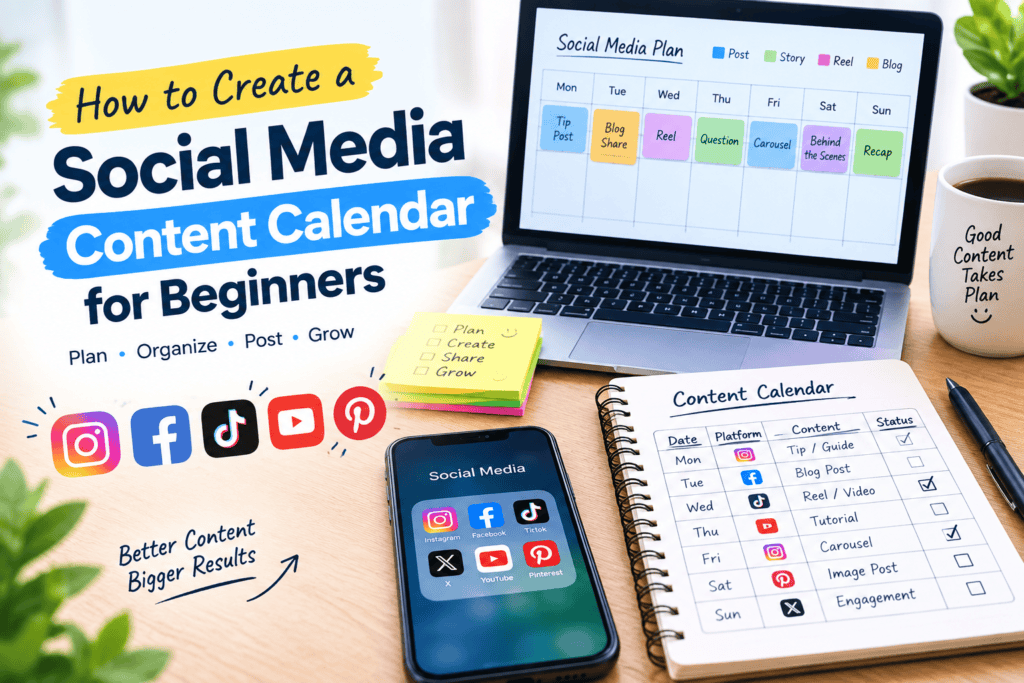
Example of a Social Media Content Calendar
| Date | Platform | Content type | Topic | Goal |
|---|---|---|---|---|
| Monday | Image post | Helpful beginner tip | Engagement | |
| Tuesday | Blog promotion | Share a useful article | Website traffic | |
| Wednesday | Reel | Quick tutorial | Reach | |
| Thursday | Educational post | Industry-related advice | Awareness | |
| Friday | Carousel | 5 useful tips | Saves and shares | |
| Saturday | Question post | Ask followers a question | Interaction | |
| Sunday | Story | Weekly recap | Community building |
This example is only a starting point. You can adjust the schedule according to your audience, available time, and chosen platforms.
Why Is a Social Media Content Calendar Important?
Creating content without a plan can lead to inconsistent posting and repeated ideas. A calendar gives your social media activity a clear structure.
Here are some important benefits of using a content calendar.
1. Saves Time
Instead of thinking about a new post every day, you can plan several posts during one dedicated planning session.
For example, you can spend one hour on Sunday preparing ideas for the upcoming week. This can make content creation easier to manage.
2. Keeps Your Posting Consistent
A content calendar helps you remember when you want to publish content. Consistency can make it easier for your audience to know when to expect updates.
You do not need to publish several times a day. A manageable schedule that you can maintain is more useful than a plan that becomes difficult to follow.
3. Helps You Organize Content Ideas
You can write down interesting ideas as soon as they come to mind. This prevents you from forgetting useful topics.
For example, a technology blog might collect ideas such as:
- Android storage tips
- Smartphone maintenance
- AI tools for beginners
- Online safety advice
- Useful productivity apps
These ideas can later become social media posts.
4. Improves Content Variety
A calendar helps you avoid publishing the same type of content repeatedly.
You can mix educational posts, questions, videos, blog promotions, tips, and behind-the-scenes content.
5. Makes It Easier to Measure Results
When you know what you posted and why you posted it, you can review the performance of different content types.
You can compare which posts received more comments, shares, saves, or website visits. These results can help you improve future planning.
Step 1: Define Your Social Media Goals
Before creating a content calendar, decide what you want to achieve.
Your goal should guide the type of content you create.
Common social media goals include:
- Increasing brand awareness
- Getting more website visitors
- Building an online community
- Promoting products or services
- Increasing audience engagement
- Sharing educational information
- Generating leads for a business
Example
Suppose you have a technology and news blog. Your main goal may be to increase website traffic.
In that case, your content calendar could include:
- Short technology tips
- Links to useful blog articles
- Educational carousel posts
- Short videos explaining common problems
- Questions related to technology trends
If your goal is community engagement, you may include more questions, polls, and discussions.
Important: Choose one or two main goals at the beginning. Too many goals can make your content strategy confusing.
Step 2: Identify Your Target Audience
A successful social media content calendar should focus on the people you want to reach.
Ask yourself:
- Who is my target audience?
- What problems do they have?
- What topics interest them?
- Which social media platforms do they use?
- What type of content do they prefer?
- What questions do they frequently ask?
Example: Technology Blog Audience
If your blog focuses on technology, your audience might include:
- Students
- Smartphone users
- Beginner bloggers
- Small business owners
- People interested in apps and gadgets
You can create content that answers their common questions.
For example, instead of publishing a general post about technology, you could create:
“5 Simple Ways to Free Up Storage on Your Android Phone.”
A specific topic is easier to understand and gives your audience a clear reason to read or watch the content.
Step 3: Choose the Right Social Media Platforms
You do not need to use every social media platform when you are starting.
Choose one or two platforms that fit your content and audience.
Instagram can be useful for visual content, short videos, educational carousels, and brand-building posts.
Content ideas include:
- Reels
- Infographics
- Carousels
- Stories
- Product images
- Quick tips
Facebook can be useful for sharing articles, participating in communities, posting updates, and encouraging discussions.
Content ideas include:
- Blog links
- Educational posts
- Questions
- Short videos
- Business updates
- Community discussions
TikTok
TikTok is designed around short-form video content. If you enjoy creating videos, you can use it for tutorials, explanations, and creative educational content.
LinkedIn may be suitable for professional content, business advice, career-related topics, and industry insights.
Pinterest can be useful for visual content discovery, especially when your website publishes guides, recipes, design ideas, or other topics that work well with images.
How to Choose Your Platforms
Start with the platforms that match your audience and content style. Learn how each platform works, then expand gradually if you have enough time and resources.
Step 4: Choose Your Main Content Categories
Content categories, also called content pillars, are the main subjects you regularly publish.
They make it easier to generate ideas and maintain a consistent brand message.
For a technology blog, your content pillars could include:
Educational Content
Teach your audience something useful.
Examples:
- How to clear storage on Android
- What is cloud storage?
- How to use two-factor authentication
- How to protect your online accounts
Tips and Tricks
Share quick and practical advice.
Examples:
- Smartphone battery-saving tips
- Useful keyboard shortcuts
- Simple blogging tips
- Productivity tricks
Blog Promotion
Share useful articles from your website.
Examples:
- New blog post announcements
- Article summaries
- Important points from a guide
- “Read the full article” posts
Community Content
Encourage your audience to participate.
Examples:
- Ask a question
- Share a technology opinion
- Request topic suggestions
- Create a simple quiz
Behind-the-Scenes Content
Show how you create your content or manage your website.
Examples:
- How you research blog topics
- Your content-writing process
- A look at your planning notebook
- How you design a blog cover image
A simple content strategy might use four or five categories. You can adjust the balance depending on your goals.
Step 5: Brainstorm Social Media Content Ideas
Once you have chosen your content categories, start creating a list of possible topics.
Do not try to create every post immediately. First, collect ideas in one place.
Ways to Find Content Ideas
1. Use Common Audience Questions
Think about the questions your audience asks.
For a technology website:
- Why is my phone storage full?
- How can I improve my online security?
- What is the difference between an SSD and an HDD?
- How can beginners use AI tools?
- How do I organize my digital files?
2. Turn Blog Articles Into Social Posts
One blog article can produce several social media posts.
For example, your article about Android storage could become:
- A short tip about deleting unnecessary downloads
- A carousel explaining storage categories
- A Reel about checking storage usage
- A question asking followers about their phone storage
- A link post promoting the complete article
This is called content repurposing.
3. Look for Seasonal or Relevant Topics
You can plan content around events, holidays, product launches, or topics that are relevant to your audience.
Make sure the content is genuinely useful and relevant to your niche.
4. Review Your Previous Content
Look at posts that generated meaningful engagement or useful questions.
You can use those insights to develop related topics without simply copying the same post.
Step 6: Decide How Often You Want to Post
There is no universal posting frequency that works for every social media account.
The right schedule depends on:
- Your available time
- Your audience
- Your platform
- Your content format
- Your goals
- Your ability to create quality content
If you are a beginner, start with a schedule you can realistically maintain.
Beginner-Friendly Weekly Schedule
| Day | Suggested content |
|---|---|
| Monday | Educational tip |
| Tuesday | Blog promotion |
| Wednesday | Short video |
| Thursday | Question or discussion |
| Friday | Carousel or infographic |
| Saturday | Helpful resource |
| Sunday | Weekly recap or planning |
You can also start with three posts per week instead of posting every day.
Consistency is easier when your schedule is realistic.
Step 7: Choose the Right Content Format
Different topics work better in different formats.
Your content calendar should include a mixture of formats where appropriate.
Image Posts
Image posts are useful for short tips, announcements, quotes, and visual explanations.
Example:
“3 Simple Ways to Organize Your Android Storage.”
Carousel Posts
A carousel contains multiple slides that users can view one after another.
For example:
- Slide 1: How to Free Up Android Storage
- Slide 2: Check Your Storage Usage
- Slide 3: Remove Unused Apps
- Slide 4: Review Downloads
- Slide 5: Read the Full Guide
Short Videos
Short videos can explain a process quickly.
Examples:
- How to check phone storage
- How to find downloaded files
- How to organize apps
- Three useful technology tips
Stories
Stories can be useful for short updates, questions, reminders, and behind-the-scenes content.
Blog Link Posts
These posts encourage readers to visit your website for a complete guide.
Example:
“Is your Android phone running out of storage? We have shared simple methods to help you review unnecessary files and organize your phone. Read the complete guide on our blog.”
Step 8: Create a Monthly Content Calendar
After brainstorming ideas, organize them into a monthly plan.
A monthly calendar gives you a wider view of your content and helps you avoid repetition.
Sample Monthly Calendar for a Technology Blog
| Week | Monday | Wednesday | Friday |
|---|---|---|---|
| Week 1 | Android storage tip | Short technology Reel | Blog promotion |
| Week 2 | Online security tip | App tutorial | Educational carousel |
| Week 3 | Smartphone maintenance | Technology question | Blog promotion |
| Week 4 | Productivity tip | Quick tutorial | Monthly technology recap |
This is a sample plan. You can add more posts if you have the time and need.
What to Include in Your Calendar
Every planned post should have a few basic details:
- Publishing date
- Platform
- Topic
- Format
- Caption idea
- Visual idea
- Link, if applicable
- Status
A simple spreadsheet can be enough to manage all of this.
Step 9: Write Captions for Your Social Media Posts
A good caption should explain the value of your post and encourage the audience to take an appropriate action.
A simple caption structure is:
- Start with an interesting opening.
- Explain the main benefit.
- Share a useful detail.
- Add a relevant call to action.
Example Caption
Topic: Android storage tips
“Running out of space on your Android phone? 📱
Start by checking large videos, unused apps, old downloads, and unnecessary screenshots. Review your files carefully before deleting anything important.
Want more useful smartphone tips? Read our complete guide on freeing up Android storage.”
This caption is simple, informative, and connected to the blog topic.
Step 10: Create Visuals for Your Content
Visuals can make social media posts easier to understand.
Depending on your topic, you can create:
- Infographics
- Screenshots
- Product images
- Short videos
- Illustrations
- Educational slides
- Blog cover images
Tips for Better Visuals
- Keep the design easy to read.
- Use a consistent style.
- Avoid placing too much text on one image.
- Make sure important text is visible on mobile screens.
- Use clear and relevant images.
- Check spelling before publishing.
- Make sure your visuals match your brand.
For a technology blog, a simple design featuring a smartphone, icons, and a short headline may work well for educational content.
Step 11: Plan Your Content in Advance
Once you have your topics and formats, prepare the content before the publishing date.
Your workflow might look like this:
Monday: Research
Find useful topics and collect reliable information.
Tuesday: Writing
Prepare captions, article summaries, and video scripts.
Wednesday: Design
Create images, carousels, or other visual content.
Thursday: Review
Check spelling, links, formatting, and accuracy.
Friday: Schedule
Prepare posts for publication using your preferred scheduling method.
Weekend: Review
Check how your content performed and plan the next week.
You do not have to follow these exact days. The goal is to separate planning, creating, reviewing, and publishing so the process is easier to manage.
Step 12: Use a Content Scheduling Tool
Scheduling tools can help you organize and prepare posts in advance.
Depending on the platform and features available, you may be able to schedule posts, manage captions, and review publishing plans.
Possible tools include:
- Meta Business Suite for supported Facebook and Instagram management tasks
- A spreadsheet for manual planning
- A calendar application for reminders
- A social media management platform that supports your chosen networks
Before using a tool, check which platforms and content formats it supports.
Scheduling is optional. You can also publish manually using your calendar as a guide.
Step 13: Review and Edit Your Content Before Publishing
Before publishing a post, take a few minutes to review it.
Content Review Checklist
- Is the topic relevant to my audience?
- Is the information accurate?
- Is the caption easy to understand?
- Does the image or video match the topic?
- Is the spelling correct?
- Does the link work?
- Is the call to action clear?
- Does the post follow the platform’s rules?
- Have I avoided using copyrighted material without permission?
A short review can help you catch mistakes before your audience sees the post.
Step 14: Track Your Social Media Performance
Creating a content calendar is only the beginning. You should also review how your content performs.
Useful metrics may include:
Reach
Reach refers to the number of unique accounts that saw your content, according to the platform’s reporting system.
Impressions
Impressions count the number of times content was displayed. One person may generate multiple impressions.
Engagement
Engagement can include likes, comments, shares, saves, and other interactions, depending on the platform.
Link Clicks
Link clicks can help you understand how many people clicked a link in your post.
Website Visits
If your goal is to increase blog traffic, website analytics can help you review visits that came from social media.
Follower Growth
Follower growth shows how your audience size changes over time. It should be considered alongside engagement and the quality of your audience.
Do not focus on only one metric. A post with fewer views may still be useful if it brings relevant visitors to your website.
Step 15: Improve Your Calendar Every Month
At the end of each month, review your content calendar.
Ask yourself:
- Which topics received useful engagement?
- Which posts brought visitors to my website?
- Which content formats were easiest to create?
- Which posts took too much time?
- What questions did followers ask?
- Which content should I create more often?
- What should I change next month?
Use these observations to make your next calendar more practical.
You do not need to change everything at once. Small improvements can make your content workflow easier.
Common Social Media Content Calendar Mistakes
Beginners often make a few common mistakes when planning social media content.
1. Trying to Post on Every Platform
Managing too many platforms can become difficult. Start with the platforms that fit your goals and audience.
2. Creating an Unrealistic Schedule
A calendar with several posts every day may look impressive, but it can be hard to maintain.
Choose a schedule that fits your available time.
3. Posting Without a Clear Goal
Every post does not need to sell something. However, you should understand whether a post is intended to educate, inform, engage, or promote.
4. Using the Same Content Repeatedly
You can repurpose content, but try to adapt it to each platform and audience.
5. Ignoring Audience Feedback
Comments and questions can provide useful ideas for future content.
6. Focusing Only on Follower Count
Follower numbers are not the only measure of success. Relevant engagement, website visits, and useful interactions can also matter.
7. Forgetting to Review Content
A calendar should be updated when plans change. Do not feel obligated to publish content that is outdated or no longer relevant.
Free Social Media Content Calendar Template
You can copy the following structure into a spreadsheet or notebook.
| Date | Platform | Topic | Format | Caption | Link | Status |
|---|---|---|---|---|---|---|
| 1st | Technology tip | Image | Write caption | Optional | Idea | |
| 2nd | Blog article | Link post | Write caption | Add URL | Planned | |
| 3rd | Quick tutorial | Reel | Write caption | Optional | Draft | |
| 4th | Audience question | Text | Write question | None | Planned | |
| 5th | Helpful guide | Carousel | Write caption | Optional | Published |
You can add columns for content goals, keywords, hashtags, visual files, and performance results.
Frequently Asked Questions
What is the best social media content calendar for beginners?
A simple spreadsheet or notebook is often enough for beginners. Choose a format that allows you to record dates, topics, platforms, captions, and publishing status.
How far in advance should I plan social media content?
Many beginners can start by planning one week in advance. Once the process becomes easier, you can prepare a monthly calendar.
How many times should I post on social media?
There is no single ideal number for every account. Start with a realistic schedule and adjust it according to your audience, platform, and available time.
Can I use one content calendar for multiple platforms?
Yes. One calendar can include several platforms. Add separate columns for each platform and adapt the content to suit its format and audience.
What should I post when I have no content ideas?
Review common audience questions, your previous blog articles, useful tips, tutorials, and frequently discussed topics in your niche. Keep an ongoing list of ideas.
Is a social media content calendar useful for small businesses?
Yes. It can help small businesses organize promotional content, educational posts, announcements, and audience interactions without needing to plan every post at the last minute.
Can I create a social media content calendar for free?
Yes. You can create one using a notebook, a spreadsheet, or a basic calendar application. You do not need expensive software to begin.
Final Thoughts
Learning how to create a social media content calendar for beginners can make your online content strategy more organized and manageable.
Start by defining your goals, identifying your audience, and selecting the platforms that fit your needs. Then choose content categories, brainstorm ideas, and create a realistic weekly or monthly schedule.
Use a spreadsheet or notebook to organize your topics, captions, visuals, links, and publishing dates. Review your content before publishing and use performance data to improve future plans.
Remember that successful social media planning is not about publishing as much content as possible. It is about creating useful, relevant, and consistent content that serves your audience.
Start with a simple weekly calendar, learn from your results, and improve your strategy over time.
A clear content calendar can turn random social media posting into a more organized and purposeful content workflow.